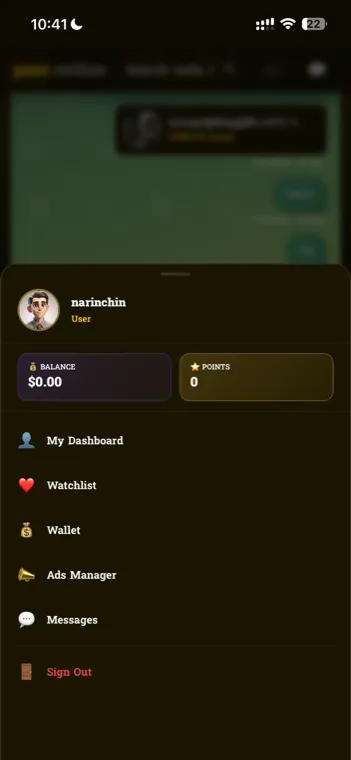
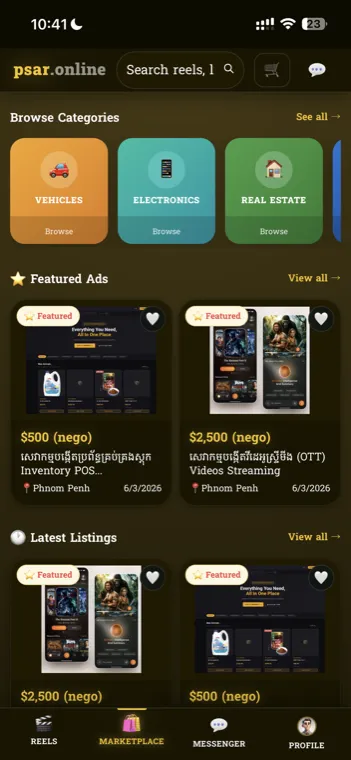
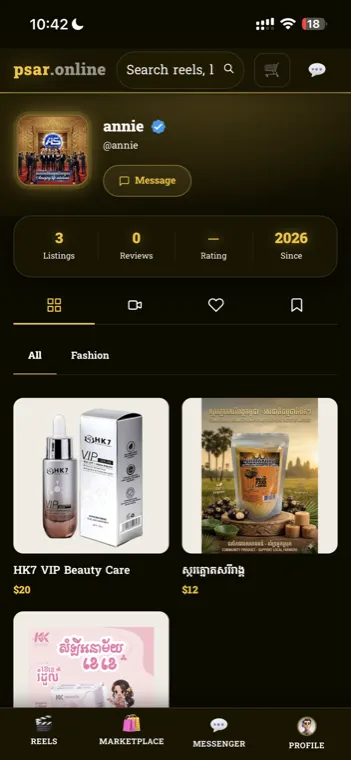
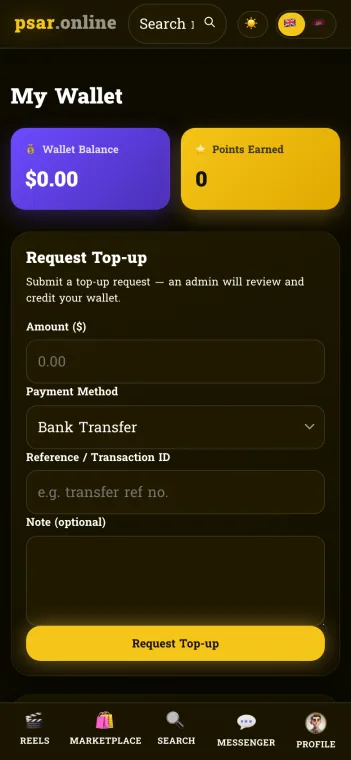
Psar Online blends a full marketplace & store POS, a TikTok-style reels engine with an FFmpeg → HLS video pipeline, a wallet & points economy, a Telegram Mini App, reels advertising, and a complete SuperAdmin control center — on web, PWA, iOS & Android.
A vertically-integrated commerce + content platform — from raw video upload to a sold product, tracked end to end.

Vertical short-video feed with adaptive HLS streaming, muted autoplay, categories, follows, likes, comments and shoppable product cards — and the same feed carries photo and text posts.

Listings, live search, cart & checkout, vendor stores, orders, reviews and watchlists — with featured & sponsored placements.

Per-vendor dashboard with Products, POS, Orders, delivery and settings — mirrored two-ways with the marketplace.

In-app balance with top-ups & approvals, plus a points/rewards system that tracks engagement and spending.

The whole site runs inside Telegram, with channel broadcasting and deep links that open products & reels directly.

Ads that play inside reel playback — pre-roll, mid-roll or post-roll, skippable or not, with budgets and automatic pause when the budget is spent.

The latest features and improvements shipping to Psar Online — newest first.
A reel now plays in its own shape instead of being zoomed in to fill the screen. Nothing is cut off any more — a logo in the corner, or a caption near the edge of the frame, stays visible the whole way through. Where the video does not reach the edges, the space around it fills with a blurred, dimmed version of the cover image.
Version 1.2.8 went to the App Store and Google Play, and 1.2.9 has followed it. 1.2.8 carries the timeline bar on a photo post with sound, a Telegram channel button in the reels player, and a fix for the ads that play in reels. 1.2.9 brings Affiliates into your profile menu and your wallet, a discount on the POS cart, and stock, expense and profit reports for your shop. Until 1.2.9 is approved, the website always has the newest work first.
The POS cart now takes a discount, either an amount off or a percentage. Subtotal, Discount and Total sit above the Charge button, so the figure on screen is the figure you take. The receipt shows the discount line and the amount actually charged, and your sales reports count what the sale really brought in, with the discount shared across the products on it.
Store Settings has three new tabs. Inventory is where you record stock as it arrives, with what you paid for each unit, and a sale is entered for you the moment an order is marked paid. Expenses is for what you spend outside stock — advertising, rent, salaries and the like. Reports covers one year at a time and shows revenue from paid orders, the cost of the goods you sold and the expenses you recorded, and the profit left over.
The admin panel behind Psar Online now has staff logins, so each person who helps run the platform signs in as themselves and sees only the parts they work on. Each of the 20 areas, from Reels and Music to Listings and Top-ups, is given at View, which is read-only, or Manage, which also allows changes. A set of areas can be saved as a named role and reused for everyone doing the same job.
Your Affiliates panel now shows the people who signed up through your link, newest first, with each one's name, photo, the day they joined and the points that sign-up earned you. It is easier to find too: an Affiliates card now sits in your profile menu and another on your wallet page, each showing how many people have joined on your link and taking you straight there.
Sharing a post to our Telegram channel or our Facebook Page used to mean picking from the 300 newest ones, so anything older could not be sent at all. A search box now looks through everything live on Psar Online, matching the title or the words inside the post. Photo posts and video reels sit in one list, each one labelled, so an older post goes out the same as a new one.
You can now post photos and words instead of a video. Pick up to 10 photos, write a headline and as much text as you like, and add a soundtrack from the music library or record your own voice-over. Your post sits in the same feed as reels, with the same likes, comments, saves and product tags. A post with several photos plays as a looping carousel, and one with sound shows the same timeline bar a reel does.
The player has been reworked. The creator photo now heads the action rail on the right, with Follow as a badge on the photo itself, and the caption line it left behind carries the reel category — tap it to browse everything in that category. Share sits directly under the heart, the publish date shows above the title, and a product card no longer runs underneath the buttons on the right. Tapping a reel pauses it; tapping again carries on.
Version 1.2.7 has been submitted to the App Store and Google Play and is waiting on review. It carries photo posts, the reworked reels player, the rebuilt dashboards and everything else from the past month. Until it is approved, 1.2.6 is the version on your phone, and the website always has the newest work first.
Your phone now tells you when somebody likes or comments on something you posted, and tapping the notification opens that post. Comments reach you straight away. Likes are gathered into at most one message an hour per post, with the running total, so a post doing well does not fill your screen. Your own likes and comments never notify you.
The buyer and vendor dashboards now fit a phone screen properly. The navigation sticks under the header and scrolls in its own strip, the main action becomes a full-width button instead of sliding off the edge, and the stat tiles sit two to a row. Wide tables scroll on their own rather than dragging the whole page sideways.
An advertiser video no longer takes a slide of its own in the feed. It plays inside the reel you are already watching — before it starts, part-way through, or at the end — and the reel picks up at the exact second it paused. Some ads can be skipped after a few seconds, others play out. Advertisers choose the break, the skip rule and the mid-roll cue point when they build a campaign.
The seller area has been rebuilt around a sidebar that follows you everywhere — Dashboard, Creator Studio, Affiliates, Orders, Store Settings and your public store are each their own page now, so you can bookmark them and a refresh keeps you where you were. The shop dashboard shows takings for the day, week or month against the period before, a week-sales chart, what is paid and unpaid, and lists for best sellers, top customers and low stock. Orders opens with any buyer who messaged you and has not been answered.
Alongside the Telegram channel, chosen reels are now published to a Facebook Page automatically. Posting is spread through the day — a set number an hour, inside daytime hours only — and each reel is recorded once it has gone out, so a restart never posts the same video twice. The Facebook queue runs separately from the Telegram one, so a problem with either leaves the other running.
The newest reels now arrive as a fanned deck of cards you can flick through, instead of another row of thumbnails. Featured products are proper offer cards — a big photo, the category, the title and the price, with the seller logo in the footer. And every reel category is now a page of its own, so you can open one and keep watching just that.
The Android app is now live on Google Play — search for Psar Online, or tap the install badge on the sign-in screen. It does everything the iPhone app does: reels, the marketplace, your wallet, messages and notifications.
Version 1.1.0 is live on the App Store. It brings reel imports by link, comment and save counts on the reel icons, title suggestions when you upload, and a full-width search panel on phones.
Paste a YouTube, Facebook or Kuaishou link and we download the video and convert it for you. You can paste the whole shared message — the caption is trimmed off automatically, leaving just the link. And if that video is already on Psar Online, we tell you straight away instead of letting you post it twice. Imported reels also keep the creator's own cover image as their thumbnail.
Comment and save counts now show right on their icons, so you can see how a video is doing at a glance. The dark fade across the bottom of videos is gone for a cleaner picture. And the upload screen remembers the titles you have used before, suggesting them back as you type.
Newly posted reels are now shared to our Telegram channel on their own — a couple an hour through the day — so your videos find viewers beyond the app.
The app now opens straight to the Reels feed, so you can browse and pick what to watch. Tap any video for the full-screen player — with Save and Like now together on the right — and when you go back, you return to the exact spot you left, with your feed still loaded.
Psar Online 1.0.4 is live on the App Store with a brand-new launch screen featuring our gold logo, plus all the latest reels and marketplace improvements.
Creators now earn points and real wallet money from their reels — from views, the ads shown alongside them, and taps on their product cards. Your earnings are tracked right in your dashboard, and pay out to your wallet automatically.
Every account now has a unique referral link and QR code. Share it and earn points for each friend who signs up — with your referral stats and totals shown in your dashboard.
On phones, reels now show as a fast two-column grid that mixes every category and keeps loading as you scroll. And if you scroll away from a video before it finishes, it resumes right where you left off when you come back.
Psar Online 1.0.2 is live on the App Store with a fresh app icon and all the latest features, and the Android app can be downloaded directly from the login screen.
Add styled, draggable text to any reel — pick colours, an outline / drop-shadow / neon / label style, size and left-center-right alignment. It's burned into the video on publish and renders Khmer perfectly.

Reels now play in a shuffled order and remember what you've already watched this session, so you keep seeing fresh videos instead of repeats — while any reel stays one tap away to rewatch.
When you post to an existing drama series, the next episode number is picked automatically and already-used episodes are locked. A new option can hide the “Season / EP” labels on the episode carousel for a cleaner look.
A quick edit button lets you update a reel's title, description, category, linked products and drama details — or delete it — right from the player. Owners manage their own reels; admins can moderate any reel.
New Psar Online app icon and favicon rolled out across the website and installable PWA, plus a cleaner Facebook / social link preview.
A full per-vendor back office — Products, a point-of-sale, Orders, delivery and settings — kept in two-way sync with the marketplace, with Telegram order alerts.
Native iOS & Android apps (via Capacitor) with Firebase push notifications for chats, orders, wallet approvals and price-drop alerts.
All videos, images and thumbnails moved to Cloudflare R2, served worldwide through cdn.psar.online for faster loads everywhere.
Real screens from the live Psar Online — captured September 2026.


Every reel is transcoded to HLS and delivered from a global CDN.
Video saved to temp storage; duration read via FFprobe.
5 auto-thumbnails at 10/25/50/75/90% — user picks the cover.
Optional soundtrack mixed & trimmed with FFmpeg (h264 + AAC).
Transcoded to .m3u8 + segmented .ts chunks.
Pushed to Cloudflare R2 · streamed via cdn.psar.online.
A link → downloaded → FFmpeg → HLS → a native reel. Available on the web only, and only to accounts a SuperAdmin has granted — not a general user feature.
HLS.js with adaptive bitrate; a service worker caches segments (cache-first) & playlists (network-first) for instant scroll-back.
Fast temp-upload first, heavy transcode on finalize — so the UI never blocks while a reel processes.
A full social layer built for commerce — short video and photo posts in one feed, to discover, watch, follow and buy without leaving it.
A buyer-facing marketplace and a vendor-facing store system, kept perfectly in sync.
Everything shoppers need to browse and buy.
A complete back-office for every vendor.
A managed in-app balance that powers checkout and payouts.
A rewards layer that drives engagement and loyalty.
Meet users where they already are — the entire app runs inside Telegram.
Full site as a Mini App — native back button, theme sync, and vertical-swipe handling for smooth reels.
SuperAdmin posts selected products & reels to a Telegram channel with rich photo cards + action buttons.
Reels publish out to a Facebook Page automatically — a set number an hour, inside daytime hours, each one recorded so nothing posts twice. Its queue runs separately from the Telegram one.
Buttons use ?startapp links that open the Mini App directly on the exact product or reel.
Monetize the feed with in-reel advertising and self-serve campaigns (on the web and Android).
A professional dashboard built on a hover-expand icon rail with gradient stat cards, to run the entire platform.
Built to reach every device and every search engine.
iOS & Android via Capacitor, on the App Store & Play — with FCM push notifications.
Installable, offline app-shell caching, and pull-to-refresh on mobile.
Server-side OpenGraph, JSON-LD, dynamic sitemaps, robots & IndexNow — Google, Bing, Yahoo, Baidu & Yandex.
One-tap 🇬🇧/🇰🇭 flag switch with runtime whole-UI Khmer auto-translation.
Cloudflare R2 object storage served globally through cdn.psar.online.
Phone login with Telegram Gateway OTP and SMS fallback.
Push for chats, orders, wallet, ads, follows, likes & comments on your reels, and price drops.
Real-time chat with voice notes, photos and product cards.
A single Express API and SQLite core, fronted by a multi-client layer and backed by a media-processing pipeline & a global CDN.
A cohesive, role-guarded API — a representative slice of the endpoint groups.
Expand any module for how it actually works under the hood.
-ss, mapped & -shortest, transcoded to H.264 + AAC)..m3u8 playlist plus segmented .ts chunks — then uploaded to Cloudflare R2 and recorded in the DB.yt-dlp downloads it (through a proxy) → FFmpeg → HLS → a native reel, no re-upload. Kuaishou has no yt-dlp extractor, so its share page is resolved to a direct CDN mp4 first. Pasted share text is trimmed to the link, and an already-imported URL is caught by a canonical <source>:<id> key before the download starts.cdn.psar.online; a service worker caches segments (cache-first) & playlists (network-first) for instant scroll-back.ready() / expand(), native BackButton sync, theme colors, and disabled vertical-swipe so reels scroll cleanly.?startapp= deep links that open the Mini App directly on the exact product or reel.